
I Don't Write Code Anymore
Lessons from six months of letting AI agents write my code for me


Six months ago, I was staring at a state bug in a Blazor WASM application. State not syncing across files. The kind of bug I’d dealt with a hundred times before: trace the state through multiple files, hold the whole system in your head, figure out where things went wrong. Twenty, thirty minutes of work.
I’d been hearing about AI coding agents for a while. I thought they were stupid. I thought LLMs were incapable of the kind of complex logical thinking that real programming requires. But I’d been playing with VS Code’s Copilot agent mode, and something about it felt different from the autocomplete I was used to. So I decided to just let it rip on this bug.
I wrote a prompt. Then I watched. The agent went to each file, read and understood the system, talked through everything, then went back and rewrote the original source file I was looking at. Two minutes. Bug fixed. I sat there for a second, then went and told my coworker. He gave me a dismissive hand-wave.
But I couldn’t stop thinking about it. I’d underestimated the power of its simplicity. Just reading a file, using that knowledge to write a response, then feeding the result of a tool call into the next input. It’s a feedback loop, and it works remarkably well. I hit the limits of Copilot within a week, signed up for Claude Code at $200/month, and haven’t looked back. I’ve been building with agents every day for the last six months, after ten years of programming the traditional way.
Here’s what I’ve learned: building with agents requires a fundamentally different approach to software engineering. You are no longer the code monkey. You’re at the steering wheel of the machine, and your job becomes making that machine self-sufficient enough to work autonomously.
The Job Changes
Before agents, I would spend four to six hours a day programming. I always had a dozen tabs open, and half of them were documentation. Database docs, language docs, type system references, third-party library guides. The only way to figure out how to use something was to read the documentation. I’d spend long stretches on individual features.
Now I spend about an hour max on any feature. I almost never open documentation. The only time I do is when the agent isn’t getting something right, and that’s usually because I didn’t tell it to check the docs. If I just say, “Hey, next time you run into an issue you can’t fix easily, open the documentation,” it does. Problem solved.
I keep a terminal tab for each project I’m working on, usually two or three at a time. In each tab, I can split the pane and have one or two Claude Code sessions going. I spend a lot more time talking to AI and reviewing plans than being in a text editor. The only time I open VS Code now is to audit code or check git history. Most of my work happens in the terminal.
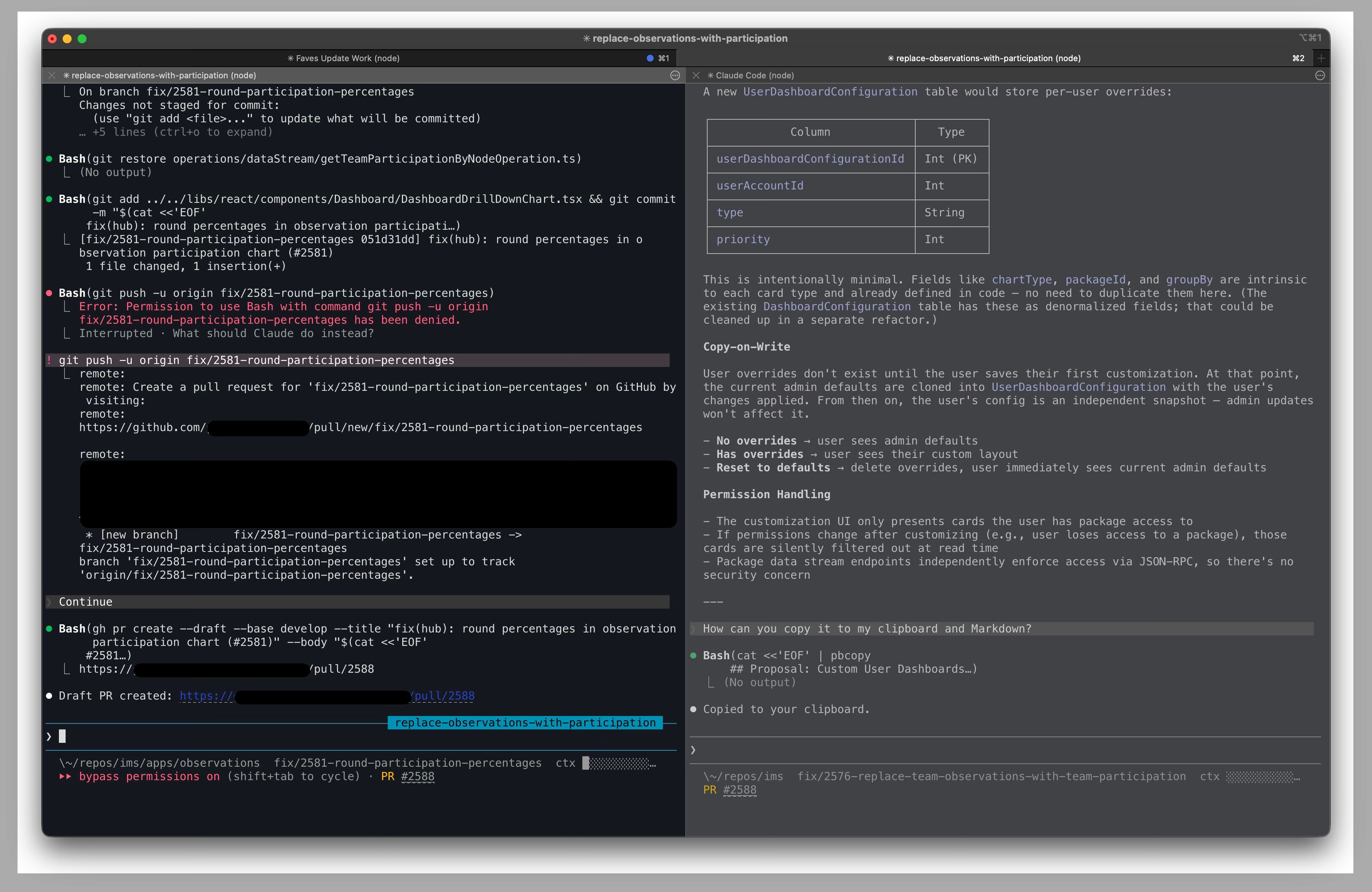
My job got faster, but it also changed a lot. When I review an agent’s plan, I’m reading a detailed markdown document and asking myself: is this how I would build it? What are they trying to do here? Does this match what I actually want? I’m looking for gaps. What’s missing, what haven’t they considered, are there caveats? Sometimes things get lost in communication. Maybe I didn’t explain something well enough and the agent assumed something that isn’t true.
This is basically what an engineering manager does in a design review. Checking alignment with intent, catching bad assumptions, spotting gaps, validating scope. That’s the new job.
The way I think about it, the new role breaks down into three things:
Specification. Tell agents what to build.
Verification. Verify that what they built actually works.
Environment. Give them an environment where they can be effective.
Everything I’ve learned in six months connects back to one of these three.
Specification: Agents Only Know What You Tell Them
Every project I start now has a CLAUDE.md file. For small projects, it starts almost empty and grows over time. Every time an agent makes a mistake that gets flagged, say in code review where someone says “you need to use that function instead,” I add an instruction. The CLAUDE.md is like memory. The agent never makes the same mistake again. Do this enough times and I can PR anything without anyone seeing anything wrong with it.
For more complex projects, like a game I’m working on, I’ll have a whole docs folder with a game design document that outlines the big picture. When files get too long, I split them off and link between them. A mechanics file, an architecture file, whatever makes sense. Claude Code has a /init command that scans your codebase and builds a starting CLAUDE.md, which is helpful for getting the basics down. But the real value comes from the caveats you learn from working with the tools.
The CLAUDE.md isn’t documentation for humans. It’s how you talk to your agents. The more specific you are, the faster and more accurate they work. You’re trying to help them solve their problems. If you guide them well, they’re confident about what they’re going to do, and confident agents produce better code.
Here’s a story that made this click for me. At work, we had a function in our caching layer that returns a user object. The TypeScript type signature said it always returned the user account interface. But in reality, it could return undefined or null. Every developer on the team knew to handle the null case because they’d used the project long enough. It was tribal knowledge. Nobody thought to question the type signature because everyone just worked around it.
Nobody told the agent. The agent built a feature using that function, the tests all passed because the cache was full in the test environment, and we shipped it. In production, it broke. A couple of users weren’t in the cache, the function returned null, and an exception got thrown inside a for loop. That exception bubbled up to a dispatcher that swallowed the error and just console.logged it. No data showed up. Hours of debugging to find a problem that traced back to one wrong type signature.
Agents force you to make implicit knowledge explicit, and sometimes that means fixing the codebase, not just writing better docs.
The agent read the code honestly. The code was wrong. The humans had been papering over it with tribal knowledge for who knows how long. The real fix is correcting the type signature, but that’s a large refactor we haven’t gotten to yet. So I documented the behavior in the CLAUDE.md and moved on. Both approaches work for the same problem.
The hard part is maintenance. Docs rot. I update mine when something breaks or when I happen to remember that something changed. There’s no great automated solution for this yet. It’s a frontier-level problem.
Verification: Testing Is How You Trust Agents
I use test-driven development as my default workflow now. I have agents write failing tests first, then implement features to make the tests pass without changing the original test cases. That instruction lives in my CLAUDE.md.
I was surprised to find that when the agent knows testing is part of the job from the start, it designs the architecture to be testable. It decouples things. It makes objects inspectable. My code is always a pain in the ass to test because it’s too coupled. But when the agent plans for testability, the tests end up clean and readable. The agent will just say something like “object has three items” in the assertion, and it reads naturally.
A few days ago, I built a CLI tool this way in about 30 minutes. I set up the project for TDD, created a long list of features that needed to be built, and let the agent go. It wrote around 1,600 lines of TypeScript, and once the tests were passing, the code was completely correct. I then had the agent write end-to-end tests for the CLI tool itself, which caught and fixed the few remaining issues. But the app pretty much required no changes at all. In total, it took about an hour to build something that before agents would have taken me probably a week of part-time work.
But unit tests only cover pure logic. They don’t tell you if the application actually works when a real user clicks through it. This matters more with agents than it ever did with human developers, because agents can produce code that’s locally correct in each file but doesn’t hold together as a system. A human developer has the whole app in their head. An agent doesn’t.
That’s where end-to-end testing comes in. E2E tests define what “working” means at the system level. If the app passes all the E2E tests and those tests define the behavior of the application, then the app works. You’re defining the parameters and the expected behavior of the broader system, and letting the agent build within those constraints.
I aim for 80%+ code coverage on most of my projects, but it depends on scale and what the project is for. The more good tests you have, the better.
Since writing the first draft of this post, I’ve also realized that verification is a lot more than testing. You still have to read agent code. Until the models get a lot better, there’s no way to know whether an agent is telling you the truth without auditing its work. What it claims to have done, what it actually did, whether the approach is sound. You can use other agent sessions to explore your codebase or review diffs, but it ultimately comes down to technical expertise. You have to be able to look at what they wrote and know if it’s right. Testing catches the obvious failures. Auditing catches everything else.
Environment: Making Agents Effective
Every choice I make about my stack comes back to one question: does this make agents more effective?
The web is the best environment for agents. It’s naturally sandboxed, it has enormous training data, it’s the most tested platform in the real world, and it’s reliable and predictable. TypeScript gives you strict type safety where the compiler catches agent mistakes before tests even run. That’s another layer of verification that doesn’t require my attention.
But the principle matters more than the specific tools. Agents need to be able to inspect what they’re building. When they can, they’re fast. When they can’t, you hit walls.
I built an MCP server for my Bear note-taking app in about 30 minutes. It inspects Bear’s SQLite database on my local machine. Most of those 30 minutes were reading and correcting the agent’s plan, not writing code. I had to correct it on several things before we landed on a good plan, and the agent kept eagerly regenerating the entire plan after every small change instead of just asking if there was anything else. You fix that kind of thing with better instructions.
A more ambitious example: I put together a 3D cooking game in about 8 hours over a weekend. I spent a couple hours during the day planning out the game design. Then at night, I handed the agent a long list of milestones and started a Ralph Loop. That’s a feedback loop where a Claude Code session reads the next task from a file, works on it, commits, runs linting and type checking and tests, then loops to the next task. I went to sleep.
I was so excited the next morning. Eight hours later, I went and checked. The logic was right. Unit tests passed. But the game looked like shit. Objects in the way everywhere, visual problems the agent couldn’t detect.
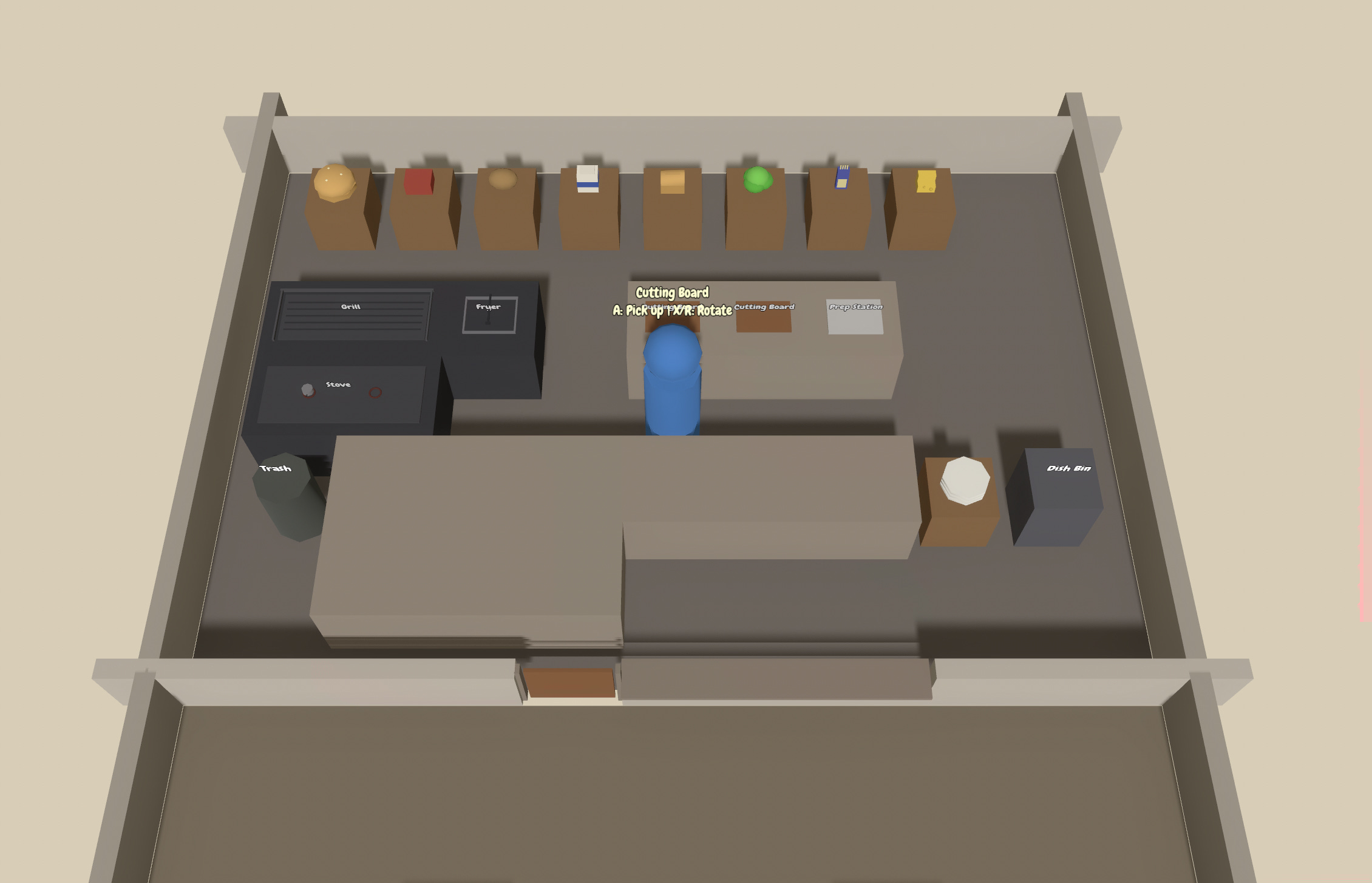
Think about all the complexity of potential 3D scenes. The agent can’t keep track of what a scene looks like. There’s no equivalent of Playwright for visual and spatial correctness. I would need something that lets the agent see the scene tree at runtime, or inspect what the game actually looks like while it’s running. That technology doesn’t exist yet. We have to build it, and each of these observability tools is its own engineering problem.
That’s the whole point. My job wasn’t to fix the visual bugs myself. It was to realize the agent needed a way to see, and then figure out how to build that infrastructure.
The Hard Part: Brownfield
Everything above is easiest when you start from scratch. Introducing agents to an existing codebase built entirely by humans is a different challenge.
The first step is simple: take all your tribal knowledge and organize it somewhere. Write a CLAUDE.md or AGENTS.md that tells agents how to access those documents: where they are, and when they should read them. If you use Notion, you can use the Notion MCP with read-only access for development. That alone covers a majority of your development concerns.
The more you explain, the better agents perform.
The three main obstacles map back to the same three pillars.
Testing comes first. How much code coverage do you have? Most codebases have low coverage if teams aren’t actively keeping up with it. Agents will expose that weakness. Bugs will pop up that are hard to solve. These aren’t new bugs that agents created. They’re the same bugs humans would create too, but humans also use the software constantly and catch things by feel. With agents, you need testing to compensate.
Infrastructure is second. Human-built applications were never intended for agents to inspect or work on. You might need custom MCP servers, custom tools, or custom workflows. Your tech stack wasn’t chosen for agents to be effective in, so you might have dependencies that get used incorrectly because of poor training data or hallucination. You can fix some of that with dependency documentation for agents.
Documentation is third. Getting that tribal knowledge out of people’s heads and into searchable documents, and then keeping it current as the project changes. Same problem as a greenfield project, just harder because the knowledge already exists in scattered, implicit forms.
My company recently sold our first AI-developed project: a mobile app rewrite of a React Native app with years of mounting tech debt. The client agreed to 20% off the otherwise human-developed contract. That 20% wasn’t us claiming proven efficiency. It was careful but eager. Let’s just see if it works. Most of us aren’t trained on agent-driven development. We’re all still experimenting.
Where This Goes
Six months in, I write less code than ever and ship more than ever. But I think about two things a lot.
What if the models don’t get much better? Right now they’re decent, but not great. You have to steer them hard. If they plateau here, the job stays frustrating.
What if they get too good? If agents can steer themselves someday, what’s left for the developer?
No model, no matter how advanced, can build something that nobody has articulated.
That’s where software engineering might be headed. Toward something more creative, where if you can articulate what you want, you can have it.
We’re not there yet. Right now it still takes tremendous technical expertise to get a quality product going and to secure it. But vibe coders are testing that boundary. I’ve seen a lot of posts from people who supposedly have no software development experience, building apps with agents, and those apps are making money. Say what you will. Maybe they have security flaws. Maybe there’s a critical bug that will cost them down the line. But some of them are getting real results without fully understanding what’s happening underneath.
For now, the job still requires knowing what you’re doing. Steer the machine, make it self-sufficient, and know what you want. The code writes itself.